
Category: Visual Basic

  • Wateen Connector v2 – For Wateen Telecom Consumers

    Wateen Connector is one of my projects that got me interested in Visual Studio .NET – some of the team members at CyberPK helped and contributed to this small utility.

    I actually made this on a request from a CyberPK’s Loyal and Regular user, I didn’t thought that other users would be experiencing the same problem like him, Until i recently fell into it myself. It sure is annoying, having to keep logging in to your Wateen WiMAX account – so Wateen Connector was created. Wateen Connector is Exclusively made for Wateen WiMAX users.

    About Pakistan’s Wateen Telecom

    Wateen Telecom is a Internet Service Provider in Pakistan, its a new venture of Warid Telcom – Wateen Telecom established one of the largest country-wide WiMAX Network in the world.
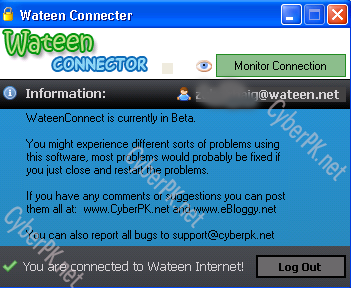
    Wateen Connector lets you log into your Wateen Services as you usually do. The extra features that you get is that Wateen Connector allows you to Monitor your internet connection and if it goes down it will let you know about it, And will ask if you like to keep monitoring it. If you set monitoring on you will be notified as soon as you disconnect or get connected – Wateen Connector also has a Auto-Login feature that logs you into your Wateen Account easily and effort-lessly!.

    Wateen Connector now lets you chat with other Wateen users using the chat services implemented on our website. One of the useful features that we added was the ability to view your bandwidth usage from the application.

    For complete detail and information visit Wateen Connector’s Homepage.

    Share
  • VB.net – How to check if you are connected to internet using VB 2005

    Determining if you or your application is connected to the internet may sound like an easy task – But it really wasn’t as easy as it sounds for me when i was trying to figure a way out to find a way to know if my computer is connected to the internet using VB.net / Visual Basic 2005. I have done quite a search on this… In my search results, I have only seen people praising to use the wininet.dll API, I do not know why people even bothered to post useless code like that, it really does not work! (more…)

    Share
  • Visual Basic .NET – using Microsoft Visual Studio 2005

    I just start programming in the .NET Environment recently – i have used Visual Basic 6 before, but the .NET Environment was new for me but still it was not so tough after all. I’m not an old VB 6 guru either 😛 I just used to make stuff on it for fun – the only i remember that i ever made on it was a Web Browser 🙂 – which i think all the new VB programmers try to make 🙂 and another app i made for fun was for MSN Messenger which was to check if a certain user doesn’t have you on their contact list or has blocked you. This was done along time ago back in the days when we used to use MSN Messenger 7.5 – now i am trying to get deeper into .NET programming. I recently started and felt very comfortable programming in it; The first application i made was a small application which i personally made for one of our network website users and myself. Now, i’m currently working on another application its a System Cleaner quite similar to www.cCleaner.com. I am using Microsoft’s Visual Studio 2005 right now, i will soon switch to Visual Studio 2008 – I have both installed, but only using VB 2005 for development; Microsoft Visual Studio 2005 and 2008 both are available Free of charge from Microsoft Website. I’ll be writing useful snippets and functions that i have found to be very useful along my learning experience.

    Share