Recently, I started upgrading all my applications to the latest versions or at least upto the version my hosting providers uses – i was using Apache 1.3.x HTTP Server, but I’ve finally upgraded to the latest version which is Apache 2.2.15 & PHP 5.3.2 as of writing this post. I think it’s a good idea to keep your Apache / PHP and MySQL up-to date with the latest release or at least up-to date to match your Web Hosting Provider. Anyways, while i was upgrading from Apache 1.3.4 to Apache 2.2.15 i ran into a problem – Apache 2 actually installed pretty smoothly without any complicated issues arising. After the Apache & PHP Installation I started to setup Apache to use PHP where the real problem begin, Apache couldn’t load the php5apache2.dll Module, it was saying that the module can’t be found (look at the below pic to see the error i was getting). 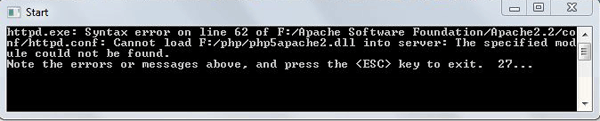 I was using the PHP Installation Manual (install.txt) all this time that came included with the PHP zip file, i had the below values added as said in that install file:
 # For PHP 5 do something like this: LoadModule php5_module "c:/php/php5apache2.dll" AddType application/x-httpd-php .php # configure the path to php.ini PHPIniDir "C:/php" I then double checked the PHP installation directory to make sure there is a file called php5apache2.dll and sure enough, it was there. While i was checking for the above file I also noticed that there is another file in that directory called php5apache2_2.dll. I tried giving that file a try and change the file name in httpd.conf from php5apache2.dll to php5apache2_2.dll, Which got it working! It was a really simple fix but very easy to overlook it. Hope this will save others (who come across this issue) some valuable time.
Tag: programming
-
Apache 2.2.x won’t load php5apache2.dll solution
-
Upload Class For PHP
class.upload.php – Free PHP Upload Class
This PHP script uploads files and manipulates images very easily. The perfect script to generate thumbnails or create a photo gallery! It can convert, resize and work on uploaded images in many ways, add labels, watermarks and reflections and other image editing features. You can use it for files uploaded through an HTML form, a Flash uploader, or on local files. It uses the GD library. This script is released under the GPL Version 2.
If your project is not GPL, commercial licenses are available.
Look at the example below:
$foo = new Upload($_FILES['form_field']); if ($foo->uploaded) { // save uploaded image with no changes $foo->Process('/home/user/files/'); if ($foo->processed) { echo 'original image copied'; } else { echo 'error : ' . $foo->error; } // save uploaded image with a new name $foo->file_new_name_body = 'foo'; $foo->Process('/home/user/files/'); if ($foo->processed) { echo 'image renamed "foo" copied'; } else { echo 'error : ' . $foo->error; } // save uploaded image with a new name, // resized to 100px wide $foo->file_new_name_body = 'image_resized'; $foo->image_resize = true; $foo->image_convert = gif; $foo->image_x = 100; $foo->image_ratio_y = true; $foo->Process('/home/user/files/'); if ($foo->processed) { echo 'image renamed, resized x=100 and converted to GIF'; $foo->Clean(); } else { echo 'error : ' . $foo->error; } } -
VB.net – How to check if you are connected to internet using VB 2005
Determining if you or your application is connected to the internet may sound like an easy task – But it really wasn’t as easy as it sounds for me when i was trying to figure a way out to find a way to know if my computer is connected to the internet using VB.net / Visual Basic 2005. I have done quite a search on this… In my search results, I have only seen people praising to use the wininet.dll API, I do not know why people even bothered to post useless code like that, it really does not work! (more…)
