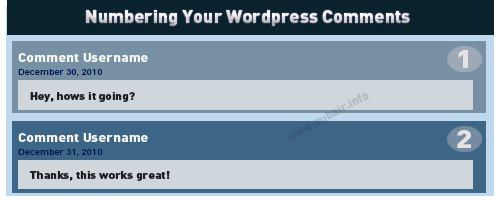
Adding Numbers to Your WordPress Comments

Add Numbers to Your WordPress Comments I was just working on making custom theme, and thought of displaying numbers on version 2.7 – but since then a lot of things have changed, I noticed the need to change things around a little to achieve the wordpress comment numbering. So this is only for WordPress version 2.7 and higher. Though, you can achieve the same with older wordpress version by just modifying the position where you place the code. Just to be clear, I have a custom comment callback function like this one:

wp_list_comments( array( 'type' => 'comment', 'callback' => 'mycustom_comments' ) );

Do note that I only am using type=comment above to show, so this is only numbers the actual comments count and not pingbacks or trackbacks. Before wordpress version 3, i had to fiddle inside the foreach loop like the one below:

<?php foreach ($comments as $comment) : ?>

But not anymore, I just have to go into my custom comment callback function named mycustom_comments and do the changes there, I do not have any loops in there.

But i assume wordpress has that function inside the loop so we don’t really have to worry about anything. Lets start, first go into your comments.php file and find the call to wp_list_comments function and add this above it.

 <?php $counter = 0; ?>

Next, we go into our custom callback function, which should be located somewhere inside the

 function mycustom_comments( $comment, $args, $depth ) { //this is the function declaration global $counter; // Make counter variable global so we can use it inside this function. $counter++; 

Finally, add the below code where ever you want the numbers to show.

 <?php echo $counter; ?> 

Sorry, i am writing this post in quite a hurry so if you see something missing, confusing or need to ask something then feel free to comment and let me know.

Share

Comments

10 responses to “Adding Numbers to Your WordPress Comments”

  1. Chris Avatar

    Thanks for the help, works great!

    1. Zubair Avatar

      @Chris: it’s my pleasure, glad it helped 🙂

      P.S:- Awesome Job on your website, mate 🙂

  2. Henrik Avatar

    Thanks mate, just what I needed 🙂

    1. Zubair Avatar

      @Henrik: Glad you found this post useful, and Thanks for commenting 🙂

  3. Marco Avatar
    Marco

    Great!!! Works like a charm! Finally, i try to figure out on this problem for all the day!

    MANY MANY THANKS

    1. Zubair Avatar

      @Marco: You’re welcome, glad to hear this was useful to you 🙂 and thanks for dropping by 🙂

  4. quiet0ne Avatar
    quiet0ne

    Awesome, thank you! Spent all afternoon looking for this.

  5. Petter Avatar
    Petter

    Thanks!

  6. Marco Berrocal Avatar

    THanks!!! Works like a charm.. question though, is it safe or best practice to use a global variable? I am a bit new to programming and thought that using globals wasn’t a best practice.

    LEt me know 🙂

    1. Zubair Avatar

      @Marco: Glad you found this post useful 🙂

      Regarding your question, I personally don’t tend to use globals in PHP other then when it is the only solution coming to my mind.

      PHP‘s Global Scope is alittle different than most languages such as Javascript where globals are used but discouraged if you can find a way around – the same could be said for PHP.

      Generally, i would not use Globals because you can always do something better. I used global above in my wordpress code example because i was in a hurry when writing this guide and i didn’t really think of any other way to gain the $counter number besides making it a global, which was the quickest and first thing that came to my mind 🙂

      There could have been better ways without using the global keyword. For Example: I could have returned the $counter++ value from the function and save it in a new variable when calling the function.

      Actually, i just went over all the code i wrote above and it seems global was the only solution at that time for me. But i still feel there could be a better solution. I’ll have to fiddle with it but don’t have anytime right now as i’m working on two other projects for my clients and don’t even have wordpress installed or setuped on my localhost atm.

      I'll revise this post as soon as possible so that it works without using the global keyword.

      In short, I would stay away from using Global in my own scripts, as later on it could cause conflicts and issues which could be harder to track.

      Thanks again for reading 🙂

      [Edited by Admin]

Leave a Reply

Your email address will not be published. Required fields are marked *